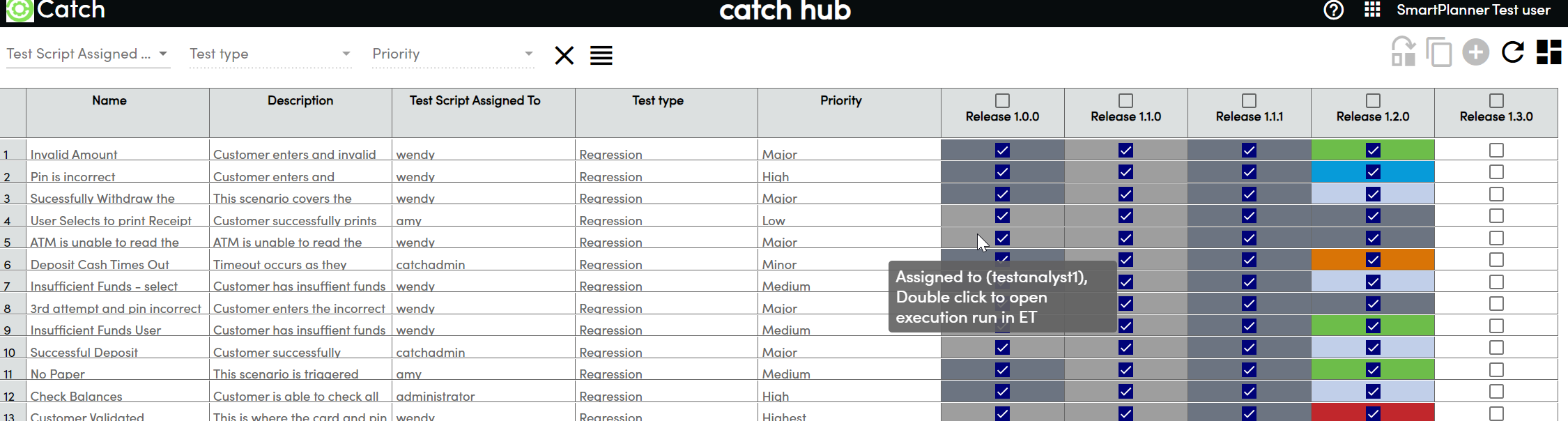
Selecting Test Scripts
You can select test scripts in the following ways:
- Select All: Check the box in the Test Cycle column header to select all test scripts.
- Select Single Script: Click on the checkbox corresponding to a single test script in the appropriate Test Cycle.
- Select Multiple Scripts: Hold down the Shift key and click to select multiple test scripts in a row.
Assigning Unassigned Test Runs
Select Unassigned Test Runs:
- Select the test runs you want to assign a user to. The Select User dropdown list will become enabled.
Select User:
- From the Select User dropdown list, choose a user to assign the test runs to. The Assign icon will become enabled.
- Hovering over the Assign icon will display the number of script runs to be assigned.
Assign Test Runs:
- Click on the Assign icon. The color of the assigned test runs will change from dark grey to light grey.
- Hover over any of the newly assigned test runs to display the assignee.